We Analyzed 50 Digital Printer Purchases by US SMBs — Here’s What the Data Actually Shows

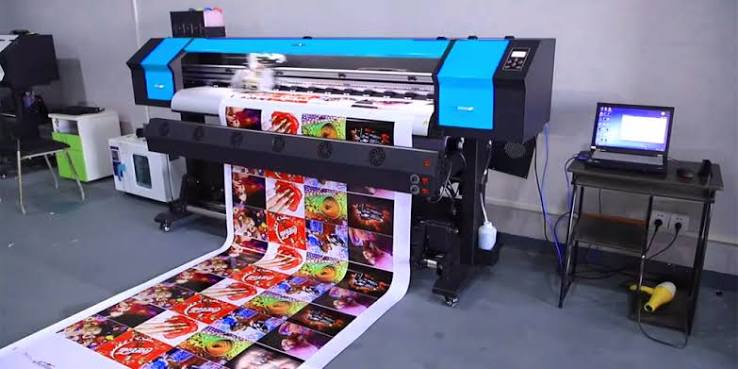
Small and mid-sized businesses in the United States are making significant capital decisions around printing equipment every year, and many of those decisions are made without a clear framework for evaluating long-term operational fit. A printer purchase that looks sound on paper can quietly generate friction — in the form of consumable costs, workflow interruptions, or output inconsistency — that only becomes visible months after installation.
To understand how these decisions actually unfold, we reviewed 50 documented digital printing equipment purchases made by US-based SMBs across a range of industries, including light manufacturing, professional services, retail, and facilities management. The sample included companies with between 10 and 250 employees, and purchases spanning entry-level desktop units to mid-range production-capable equipment. What emerged was a clearer picture of where businesses align their expectations with reality — and where they consistently do not.
What SMBs Are Actually Buying When They Choose a Digital Printer
A digital printer is not a single category of equipment — it describes a broad family of output technologies that vary significantly in how they apply ink or toner to substrate, how they handle volume, and what kinds of media they can process reliably. Across the 50 purchases reviewed, the most common misunderstanding was treating this category as uniform when it is, in practice, highly segmented.
Inkjet and laser remain the two dominant technologies in SMB procurement. Inkjet systems, particularly those using thermal or piezoelectric printheads, tend to appeal to businesses that need flexible media handling or color accuracy on a variety of substrates. Laser-based systems, which fuse dry toner through heat, are typically preferred where throughput consistency and text sharpness matter more than color range.
Why Technology Selection Often Happens for the Wrong Reasons
In roughly a third of the cases reviewed, the technology selection was driven primarily by upfront hardware cost rather than total operational cost over a two-to-three-year horizon. This pattern is understandable — procurement budgets are often structured around capital expenditure limits — but it frequently leads to situations where a lower-cost device generates higher ongoing costs through expensive cartridges, frequent head maintenance, or limited duty cycles that force early replacement.
Businesses that factored in yield per cartridge, average page cost, and expected monthly volume at the time of purchase reported significantly fewer unplanned expenses within the first 18 months of operation. The upfront savings from a cheaper unit were, in many of these cases, consumed within the first year.
The Role of Vendor Documentation in Final Decisions
Across the sample, businesses that reviewed manufacturer-published duty cycle documentation before purchase had a measurably lower rate of equipment-related downtime complaints. Duty cycle figures — which describe the maximum recommended monthly page output — are often treated as theoretical maximums rather than practical operating limits. Consistently running a device near its stated ceiling degrades components faster and increases service frequency, a pattern that appeared repeatedly in the cases that reported reliability issues.
Volume Expectations Versus Actual Usage Patterns
One of the clearest findings from the reviewed cases was the gap between projected monthly print volume at the time of purchase and actual usage six months into operation. This gap moved in both directions — some businesses overestimated their needs and ended up with equipment that was oversized for their workflow, while others underestimated growth and found themselves pushing entry-level equipment beyond its reliable operating range.
Neither outcome is immediately catastrophic, but both carry costs. Oversized equipment ties up capital and often goes underutilized, while undersized equipment fails to keep pace with demand and generates pressure to replace or supplement it sooner than anticipated.
How Growth Assumptions Distort Equipment Selection
Several businesses in the sample made their purchase decisions based on anticipated growth rather than current operational requirements. The reasoning is logical — buy ahead of demand and avoid a second procurement cycle within a few years. In practice, however, growth projections in SMB environments are often optimistic, and the result is hardware that sits underutilized during the period when volume is expected to justify it.
A more reliable approach, based on the cases that reported the highest satisfaction with their purchases, was to match equipment to current volume with a clear understanding of the threshold at which an upgrade would become necessary. This created more accurate budget planning and reduced the likelihood of purchasing equipment that became a burden rather than an asset.
The Impact of Shared Versus Dedicated Equipment
Whether a printing device is shared across multiple users or designated to a single department had a meaningful effect on both utilization and maintenance patterns. Shared devices in open office or light industrial environments showed higher rates of paper jam incidents, consumable depletion, and user-driven configuration errors. Dedicated devices, even when smaller or less capable on paper, tended to perform more consistently because usage patterns were predictable and maintenance responsibility was clearer.
This does not suggest that shared equipment is inherently problematic — it simply requires more structured management around consumable restocking, access policies, and routine maintenance scheduling.
Connectivity and Integration Expectations in Modern Work Environments
The expectation that any printing device purchased today will integrate smoothly with existing cloud platforms, mobile workflows, and networked environments is nearly universal among SMBs. In the cases reviewed, connectivity-related issues were the second most common source of post-purchase dissatisfaction, behind consumable costs.
Most of these issues were not hardware failures in the traditional sense. They were compatibility problems — devices that worked as described in isolation but required IT intervention to function correctly within a specific network configuration, operating system version, or cloud storage environment. According to documentation maintained by standards bodies such as the International Organization for Standardization, interoperability between hardware and software systems remains one of the more persistent challenges in enterprise and SMB technology integration.
Driver and Software Compatibility as an Operational Risk
Driver compatibility was flagged as a friction point in a notable portion of the cases, particularly among businesses running a mix of operating system versions or transitioning between platforms. Equipment that ships with outdated driver packages, or where the manufacturer has discontinued software support for older OS versions, creates an invisible dependency that only surfaces after installation.
Businesses that specifically verified driver support timelines before purchase — asking vendors directly about planned support windows — reported fewer post-installation IT complications. This is a low-cost due diligence step that is frequently skipped in favor of faster procurement cycles.
Wireless and Cloud Printing Realities
Wireless printing capabilities, while standard on most current equipment, varied significantly in reliability across the cases reviewed. Devices advertised as cloud-enabled sometimes required proprietary applications rather than integrating with the platforms already in use. Print-from-mobile functionality, which many businesses assumed would work natively, occasionally required additional software configuration that IT staff had not anticipated.
The businesses that managed these transitions most smoothly had conducted internal IT assessments before purchase — identifying their current platform dependencies and confirming compatibility with prospective equipment before committing to a purchase order.
Consumable Costs and the Total Cost of Ownership Problem
Across the full sample, consumable costs — ink cartridges, toner, drum units, and maintenance kits — represented the largest ongoing operational expense associated with digital printing equipment. This is not a surprise to anyone familiar with the category, but the degree to which it was underestimated at the point of purchase was consistent and significant.
Businesses that calculated total cost of ownership before purchase, rather than focusing on sticker price, showed a substantially higher rate of budget alignment over the first two years of ownership. Those that did not frequently found themselves revisiting their printing budget within 12 months.
Third-Party Consumables and the Risk Calculation
A portion of the businesses reviewed had adopted third-party or remanufactured consumables as a cost-reduction measure. The outcomes were mixed. In some cases, compatible cartridges performed adequately and reduced per-page costs meaningfully. In others, they introduced print quality inconsistencies, caused firmware-triggered error states, or voided service agreements that the business had not realized were contingent on OEM consumable use.
The decision to use non-OEM consumables is ultimately a cost-versus-risk calculation, but it is one that should be made with full awareness of the service contract implications and the specific equipment’s documented compatibility with third-party supplies.
Service Agreements and What Businesses Actually Use Them For
Service agreements were included in the majority of purchases in the sample, but the extent to which they were actively used varied considerably. Many businesses purchased extended warranties or managed print service contracts and then found they had little occasion to use them — not because nothing went wrong, but because the issues that arose were too minor to trigger a service call yet too persistent to ignore.
The most useful service arrangements, based on reported satisfaction, were those that included proactive consumable monitoring and scheduled maintenance visits rather than purely reactive repair coverage. Businesses operating in environments where any printing downtime disrupts core operations — legal, medical billing, fulfillment — placed the highest value on this kind of structured support.
Conclusion: What These 50 Purchases Tell Us About Smarter Equipment Decisions
The patterns across these 50 SMB purchasing decisions are, in aggregate, instructive. They do not point to a single correct approach — the right equipment decision is always contextual — but they do reveal where the most common and costly mistakes occur.
Upfront cost dominates decision-making in ways that total cost of ownership does not. Volume projections are frequently optimistic. Connectivity assumptions are made without adequate pre-purchase verification. Consumable expenses are consistently underestimated. And service agreements are purchased without a clear understanding of what operational scenarios they are designed to address.
The businesses that reported the highest satisfaction with their digital printing investments shared a few consistent traits: they matched equipment to current operational reality rather than projected future need, they verified software and network compatibility before purchase, they calculated consumable costs as part of their budget planning, and they selected service agreements based on specific downtime risk rather than default contract offerings.
None of this requires specialized procurement expertise. It requires structured questions asked before the decision is made, rather than operational adjustments made after the equipment is already installed. For SMBs operating under tight margins and limited IT resources, that front-loaded diligence is the most effective form of risk management available.