There’s a funny thing that happens when a small business starts posting on Instagram. The product might be brilliant. The founder might be passionate. The brand story might be genuinely moving. But if the visuals look like they were shot under a kitchen ceiling light on a Tuesday evening — nobody stops scrolling.
That’s the brutal reality of social media in 2025. Perception moves faster than truth. And for small businesses competing against brands with dedicated photography budgets, the visual gap can feel impossible to close.
Except it isn’t. Not anymore.
The Visual Problem Every Small Business Faces
Professional product photography costs money. A decent studio session, a photographer, props, editing — you’re easily looking at hundreds of euros before a single image goes live. For a solo founder bootstrapping a candle brand or a designer launching their first print collection, that’s simply not viable every week.
Yet consistency is everything on social media. Algorithms reward regular posting. Audiences expect a cohesive aesthetic. And the brands that look polished tend to get trusted faster — even when they’re tiny operations run from a spare bedroom.
This is exactly where Free mockups step in and quietly change everything.
What a Mockup Actually Does for Your Brand
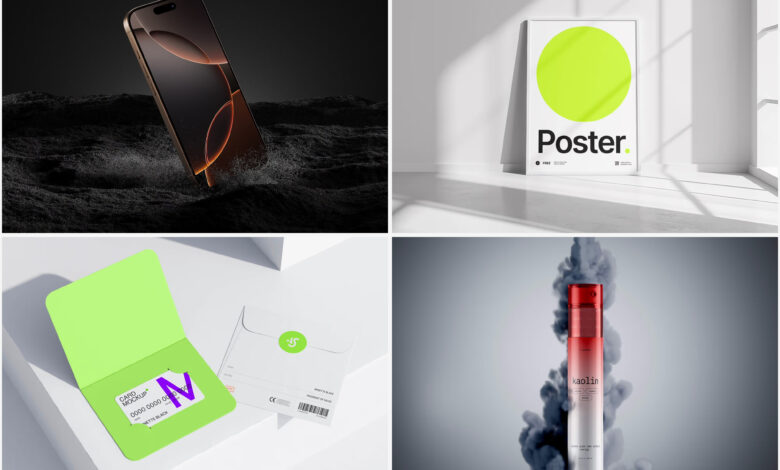
A mockup is a pre-built, photorealistic scene into which you drop your design, logo, or product image. Instead of physically printing fifty variations of your packaging to photograph them, you place your artwork into a ready-made composition and export a stunning visual in minutes.
The result? Your brand looks like it has a creative team. Even when it’s just you, a laptop, and a strong coffee.
Here’s what that unlocks in practice:
- Consistent posting without scheduling expensive photo shoots every time you launch something new
- Multiple format variations — square posts, stories, carousel slides — all from one mockup set
- A/B testing visuals before committing to print or production, saving real money on mistakes
- A polished, professional aesthetic that builds trust with cold audiences who’ve never heard of you
Real-World Examples: Mockups in Practice
Let’s get specific, because abstract benefits don’t pay the bills.
The Soap Maker. A small-batch soap brand in Amsterdam wanted to promote a new lavender line. Instead of a shoot, she dropped her label design into a clean flat-lay mockup — marble surface, soft shadows, botanical props already in the scene. Posted to Instagram Stories. Engagement tripled compared to her phone photos.
The Freelance Designer. A graphic designer in Lisbon used mockups to build his entire portfolio before he had real clients. Branding projects shown on notebooks, tote bags, coffee cups — all mockups. Clients assumed he had years of hands-on experience. He landed his first retainer within three weeks of launching the portfolio site.
The Print-on-Demand Seller. An Etsy shop owner selling custom tote bags couldn’t afford inventory photography for every design variation. Mockups let her list twenty colorways of the same bag in a single afternoon. Her shop looked fully stocked and professionally curated from day one.
The Food Blogger Turned Brand. A recipe blogger in Berlin decided to launch her own line of spice blends. Before a single jar was manufactured, she used packaging mockups to validate the idea on Instagram — posting three label concepts and asking followers to vote. The winning design got 400 saves. She went into production knowing exactly what her audience wanted, with pre-built hype already in place.
These aren’t outliers. This is how modern micro-brands are built.
Free Mockups on ls.graphics: What Makes Them Different
Not all free mockups are created equal. Many freebies floating around the internet are low resolution, poorly layered, or practically impossible to edit without a design degree.
ls.graphics takes a different approach. Their free collection features premium-quality files with ultra-realistic rendering that genuinely competes with paid alternatives. Scenes are built with organized, clearly labeled layers so editing stays intuitive. You get multiple angles per product, different color styles to match various brand aesthetics, and compositions that feel stylish and minimalistic rather than cluttered. The Edit Online feature means you can customize mockups directly in the browser — no software required. And with a large number of free scenes available, there’s genuine variety to explore before you ever consider upgrading.
Making Mockups Work: Practical Tips
Using mockups well is a small skill worth developing. A few principles that separate the polished from the amateurish:
- Match your brand’s color temperature. Warm mockup scenes for warm brands. Cool, minimal settings for modern or technical products. Consistency beats variety.
- Don’t over-design the mockup itself. Let your product breathe. Negative space is your friend.
- Use mockups to tell a story. A notebook mockup on a desk with coffee feels lived-in. That emotion transfers to your brand.
- Repurpose one mockup across multiple formats. A single scene can become an Instagram post, a Story crop, a website banner, and an email header — all with minor adjustments. Work smarter, not harder.
- Rotate scenes seasonally. Swap your standard mockup backgrounds to reflect seasons or holidays. A product shown against warm autumn tones in October feels timely and intentional — like a brand that’s paying attention.
None of this requires advanced design skills or expensive software. It just requires intention. The businesses that use mockups most effectively aren’t the ones with the biggest budgets — they’re the ones who treat every post as a deliberate brand decision. That mindset, combined with the right tools, is what makes a small brand start to feel like an established one.
Conclusion
Looking established isn’t about faking it. It’s about presenting what you genuinely offer in the best possible light and doing that consistently enough that trust compounds over time.
For small businesses navigating tight budgets and high visual expectations, free mockups are one of the most underrated tools in the kit. They democratize production quality in a way that simply didn’t exist a decade ago.
ls.graphics has made that access even easier. Start with the free collection, get comfortable with the workflow, and watch what a great visual can do for a brand that already has something worth showing.