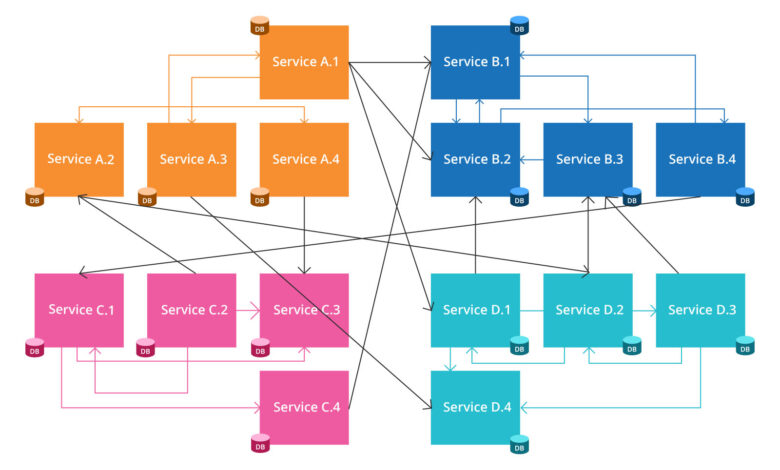
Microservices involve dividing a big application into smaller services which can each be developed, deployed, and scaled independently. The real challenge lies not merely in writing the services but in packaging them in a consistent manner and in making them work reliably in different environments. Docker provides a standard way of shipping a Java service, and Kubernetes (K8S) offers a standard approach to deploying, scaling, and repairing those containers. When you are acquiring these skills as part of a full stack Java developer training course, grasping the complete process from a runnable JAR to a resilient cluster workload means that the development decisions you make have a direct impact on how the application behaves in production.
Why Docker + Kubernetes is a Common Pattern for Java Microservices
Docker deals with a common problem encountered when deploying Java applications, namely the “it works on my machine” issue, which arises due to differences in the JVM version, OS packages, and runtime settings. By using a container image, the application is packaged together with all the components needed for its execution (with the exception of the kernel), thus ensuring that deployments can be reproduced.
Kubernetes functions as the orchestration layer; rather than having to start containers manually and keep track of any failures, you specify the desired state (that is, the number of instances, the required CPU and memory, and how the traffic should reach them), after which Kubernetes continuously works to bring the cluster in line with that state.
What You Gain in Practice
- The same image is used in the development, staging, and production environments.
- Horizontal scaling involves adding or removing replicas depending on the load.
- Restart the containers that have crashed and reschedule the pods on nodes that are functioning properly.
- When new versions are released, the process involves managing the risk and allowing for a quick rollback.
Containerising a Java Service the Right Way with Docker
A Java microservice is typically packaged as a JAR (for example, with Spring Boot, Micronaut, Quarkus, or Dropwizard). It is easy to containerise it, but achieving production readiness relies on a number of factors: the size of the image, the startup time, the security position, and the way in which the service provides health information.
Key Docker Image Practices for Java
- Start with a basic base image: using an image that contains only JRE (or one based on distroless) reduces both the image size and the potential attack surface.
- It is better to use multi-stage builds: first build using a JDK stage and then run using a smaller runtime stage.
- Run the program without using root privileges: this helps to avoid unnecessary privileges within the container.
- Store the configuration using environment variables or mounted configuration rather than hardcoding it.
- Make the health endpoints available since they can be used later by Kubernetes probes (for example, /health, /ready).
Common Packaging Decisions That Affect Runtime
- When it comes to JVM tuning, the default memory settings may behave differently within containers, so it’s necessary to set flags that are aware of the container environment and assign sensible heap limits.
- The behaviour of a startup is such that a faster startup time enhances the responsiveness of rolling updates and auto-scaling.
- Logging: Direct the logs to stdout/stderr so that the platform can collect them consistently.
Deploying Java Containers on Kubernetes
When you have a container image, Kubernetes will run it as a Pod (that is, one or more containers that are scheduled together). In the case of microservices, the usual approach is to use a Deployment (for stateless services) together with a Service (for stable networking).
Core Kubernetes Objects You’ll Use
- It declares the container image, the number of replicas, the rollout strategy, and the way in which updates are handled.
- The service offers a stable virtual IP or DNS name and distributes the traffic across the pods.
- A ConfigMap and a Secret are used to keep the configuration and the sensitive values separate from the image.
- Ingress (also known as Gateway): Directs external HTTP(S) traffic to the internal services.
A typical Java microservice is composed of: Deployment, Pods, Service, and an Ingress, the configuration being injected via ConfigMaps/Secrets and environment variables.
Scaling: From Replicas to Autoscaling
- Scaling manually is just a matter of altering the number of replicas.
- The Horizontal Pod Autoscaler (HPA) increases or decreases the number of replicas according to CPU and memory metrics (and, using metrics adapters, also takes into account custom signals).
- Resource requests and limits help to ensure fair scheduling and protect the cluster against noisy neighbours.
Stateful scaling works most effectively when your service is stateless or relies on external state (such as databases, caches, or message brokers); if the state has to remain inside the pod then StatefulSets and persistent volumes are required, thereby increasing the operational complexity.
Resilience: Making the Cluster Work for You
Kubernetes can enhance resilience, but only when the workload provides the correct signals and is set up with realistic constraints.
Health Checks That Actually Help
- Check that the process is healthy: if it isn’t, then restart the container.
- Check whether it is ready to receive traffic; if it isn’t, take it out of the load balancing.
- A startup probe (optional) is useful in the case of slow Java startup, as it prevents premature liveness failures.
They help to reduce cascading failures that occur during deployments and when there is a spike in traffic.
Safer Updates and Failures
- Carry out rolling updates by gradually replacing the pods while ensuring that capacity remains available.
- Limit voluntary disruptions (for example, node maintenance) so as not to lose too many replicas at one time.
- Multi-zone clusters. Place replicas in different zones to handle infrastructure problems.
On the side of applications, resilience also involves the use of timeouts, retries with backoff, circuit breakers, and idempotent handlers in order that a brief outage should not result in a complete outage.
Operational Essentials: Observability and Security
In a microservices architecture, saying that something is running isn’t sufficient; what’s needed are quick diagnostic capabilities and controlled risk.
Minimum Observability Stack
- Combine the logs that are centralised to correlate the request flows between various services.
- Metrics: latency, error rates, JVM memory usage, GC behaviour, and thread pools.
- Tracing: Identify where time is spent across service boundaries.
Practical Security Steps
- Scan container images for vulnerabilities.
- Use least-privilege access (RBAC) for services and humans.
- Keep secrets out of images and source code; rotate them.
Conclusion
Docker and Kubernetes combine in such a way that Java microservices become deployable, scalable, and resilient: Docker takes care of packaging while Kubernetes handles the operations involved, such as rollouts, scaling, and self-healing. The true benefit is derived from various details, including lean images, externalised configuration, defined resource limits, and meaningful health checks, since it is precisely these that enable Kubernetes to keep the services stable when changes and heavy loads occur. For teams that are developing production-ready systems by undergoing comprehensive full stack Java developer training, viewing orchestration as an integral part of the application lifecycle (rather than as an afterthought) is what makes the difference between simply having deployed a system and having a dependable one.