For a photographer, a memory card failure is not just a technical problem – it is lost clients, lost portfolios, and lost one-time moments. The right camera data recovery software is what stands between a bad day and a lost career moment.
This guide covers what photographers should look for in camera recovery software, and why Recoverit is our top pick for RAW photos, video, and professional camera formats.
Why Camera Recovery Is Different
Camera cards are not like ordinary storage. They hold:
- RAW files in brand-specific formats – CR3, NEF, ARW, RAF, and more.
- Professional video codecs – XAVC S, ProRes, HEVC – recorded by DSLRs and mirrorless bodies.
- Large, fragmented files – high-resolution photos and 4K video stored in scattered pieces.
- Brand-specific card layouts that generic tools may not understand.
- Camera recovery software has to handle these realities. A tool that only finds JPEGs and continuous files will fail on a professional shoot’s RAW and video.
Top Pick: Wondershare Recoverit
Wondershare Recoverit is built for exactly this job. It is a G2 “Leader in Data Recovery” tool used by more than five million people, and it covers the formats photographers actually shoot.
Here is what it offers for camera recovery:
- RAW and ProRes recovery* Recovers the professional formats, not just JPEG.
- Photo and video repair built in. Damaged files are repaired during preview – a corrupted RAW or video clip is often recoverable.
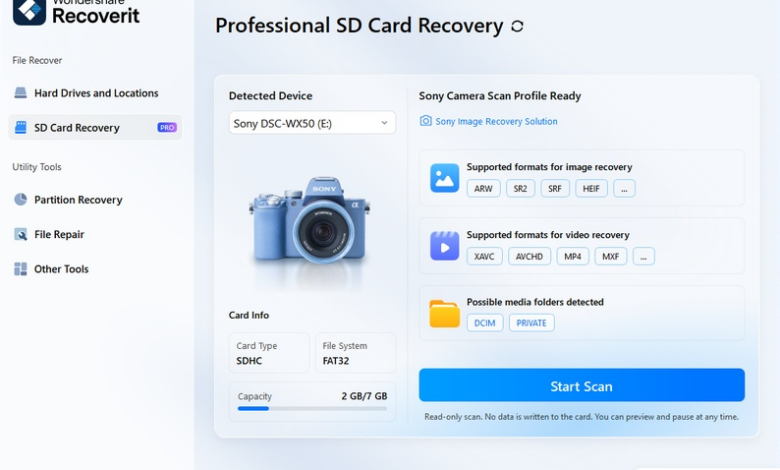
- AI device recognition. Identifies the camera brand and adapts the scan to its card layout and formats.
- Enhanced Recovery. Reassembles fragmented 4K and UHD video from cameras.
- 1,000+ formats and 2,000+ storage devices. Cards, cameras, external drives, and more.
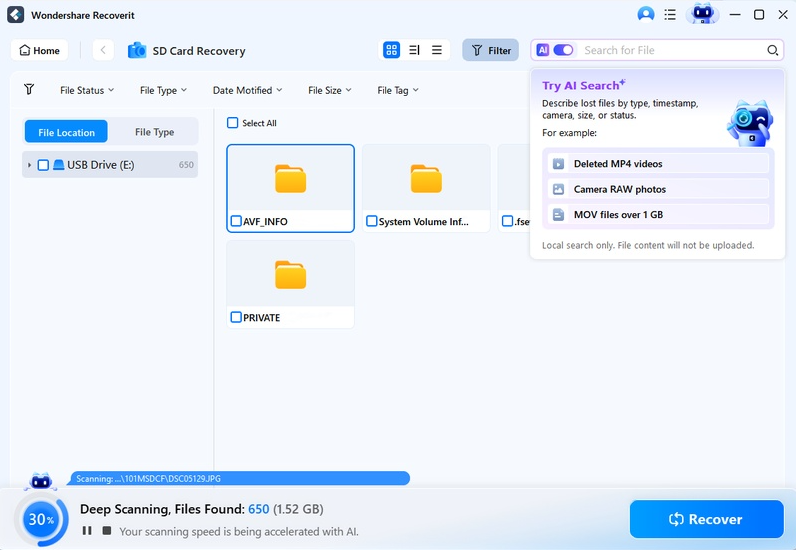
- Free scan and preview – confirm your shots are there before committing.
The workflow is three steps: connect the card, scan, and recover with preview.
What Photographers Should Look For
- RAW format coverage Confirm the tool knows your camera’s RAW format, not just generic JPEG.
- Video codec support XAVC S, ProRes, and HEVC are common in professional cameras; the tool must handle them.
- Photo and video repair A recovery tool that cannot repair damaged files leaves you with unreadable images.
- Brand-aware scanning Cards from different brands have different layouts; device recognition improves results.
- Preview accuracy. For photography, thumbnail quality matters – you need to identify the right frame.
Fitting the Tool to Your Workflow
Different jobs need different features:
- Wedding and event shoots – large volumes of photos and video; recovery must handle both.
- Studio work – RAW files from Canon, Nikon, Sony, Fujifilm; brand-aware scanning helps.
- Video-first work – the video recovery module handles professional footage.
- Portrait and product photography – the photo recovery tool covers JPEG and RAW alike.
Free vs. Paid Camera Recovery
The free version of most recovery tools lets you scan and preview, which is genuinely useful for photographers – you can confirm your shoot is recoverable before paying. The limitation is that recovery itself is paid.
Recoverit follows the scan-free-preview-free model, and its professional format support means the free scan tells you whether your RAW and video files are recoverable – the information that matters most when a shoot is on the line.
Common Camera Recovery Scenarios, Solved
To make the choice concrete, here is how the tool maps to everyday professional situations:
- You deleted the wrong card’s photos after a wedding. Pull the card, scan with the camera recovery module, preview the JPEGs and RAWs, and recover. A card not used since the deletion usually comes back nearly complete.
- The card was formatted by accident in the camera menu. Skip the quick scan and run the deep scan – formatted cards need signature-based rebuilding, which AI-powered file identification handles well.
- A video clip from a paid shoot will not play after recovery. Run video repair; if the file is severely damaged, Advanced Repair with a sample clip from the same camera usually rebuilds it.
- Your client needs an answer today. Recoverit’s free scan confirms recoverability immediately, so you can tell the client with confidence that the shoot is coming back.
Each of these is a different failure, and each maps to a different feature in the tool. That breadth is what makes it the best camera recovery software for photographers rather than just another file scanner.
When to Call a Professional Recovery Service
Software is not the answer for every card. A few situations belong to professional services with clean-room facilities:
- The card is physically broken – cracked housing, bent contacts, or water damage.
- The card is undetected by every reader and makes unusual noises.
- Software scans keep failing and the data is irreplaceable client work.
For everything short of physical damage, software recovery first is the right call. Professional services cost hundreds to thousands of dollars; Recoverit is a fraction of that, and most cards never need the clean room.
A Photographer’s Recovery Checklist
- Stop shooting on the card the moment files are lost.
- Pull the card and use a reader, not the camera.
- Scan first, preview second, recover third – always confirm before saving.
- Save to a different drive than the card.
- Repair damaged files before giving up on them.
- Back up the shoot the moment recovery succeeds.
Conclusion
Camera data recovery software has to understand RAW formats, professional codecs, and fragmented high-resolution files. Recoverit covers all of it, with photo and video repair built in and AI device recognition for the major camera brands. When a client shoot is on the line, this is the software to have ready. Start with a free scan, confirm your frames are there, and recover camera data with confidence.
READ ALSO: Emergency Tyre Replacement Hertfordshire: What Drivers Should Expect From Mobile Fitting