Professional headshots are no longer limited to studio sessions, expensive photographers, and long editing timelines. With rapid advancements in artificial intelligence, creators, professionals, and businesses can now generate highly realistic portraits from simple selfies. Whether you need a polished LinkedIn photo, a website bio image, or a team profile picture, AI-powered tools are transforming the way headshots are created.
From corporate-style portraits to creative branding images, today’s platforms focus on realism, lighting accuracy, skin tone balance, and natural facial details. In this guide, we’ll explore six of the most realistic AI headshot generator tools available right now, starting with invideo and followed by other notable platforms in the space.
1. Invideo
When it comes to simplifying professional visuals, invideo has expanded beyond video workflows into high-quality portrait generation. If you want to skip the studio visit and still create polished, business-ready images, invideo offers a streamlined solution that transforms casual photos into professional-grade headshots in seconds.
How Invideo’s AI Headshot Generator Works
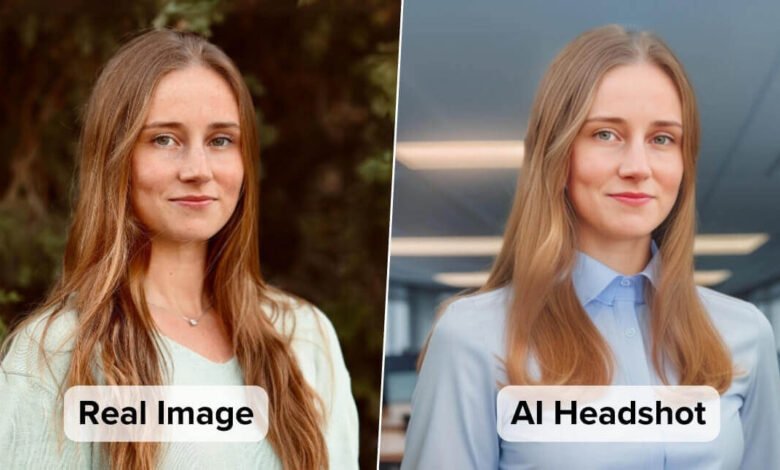
Invideo allows users to upload a regular photo—taken on a phone or webcam—and convert it into a refined studio-style image. The AI headshot generator analyzes facial structure, lighting patterns, background separation, and skin tones to produce realistic outputs suitable for professional use.
The system enhances lighting balance, smooths minor imperfections while preserving natural skin texture, and creates a neutral or corporate-friendly background. The result is a headshot that feels authentic rather than artificially retouched.
Why It Feels Realistic
The realism comes from subtlety. Instead of dramatically altering facial features, invideo focuses on:
- Maintaining accurate proportions
- Preserving eye detail and natural expression
- Improving lighting depth rather than flattening it
- Ensuring consistent color grading
This makes the output ideal for LinkedIn profiles, resumes, company websites, and personal branding pages.
Interestingly, invideo is also known as an AI video creator app, which makes it particularly useful for professionals who want cohesive branding across both photos and videos. While its video capabilities are widely recognized, its headshot functionality complements visual storytelling efforts without requiring additional tools.
2. HeadshotPro
HeadshotPro is built specifically around AI-generated corporate headshots. It has gained attention for delivering consistent results tailored to professional environments.
Professional Style Consistency
HeadshotPro allows users to upload multiple images and generate variations with different outfits, backgrounds, and lighting styles. This helps maintain consistency across company teams.
The AI recreates professional attire and studio backdrops with convincing depth and natural shadow placement, which enhances realism.
Best Use Cases
- Corporate team photos
- Startup founder profiles
- Business directories
- Recruitment platforms
The results are typically polished and aligned with corporate branding expectations, making it a strong option for structured organizations.
3. Aragon AI
Aragon AI focuses on high-resolution headshots designed for business and executive profiles. It emphasizes skin texture realism and natural expression rendering.
Advanced Facial Detailing
What makes Aragon AI stand out is its ability to retain micro-details such as:
- Subtle skin pores
- Natural hair strands
- Accurate reflections in the eyes
This attention to detail reduces the “AI-generated” look that some tools struggle with.
Versatility in Style
Users can choose between various professional aesthetics, from corporate boardroom styles to creative professional portraits. The background simulation often includes depth-of-field effects that mimic DSLR photography.
Aragon AI is especially useful for executives, consultants, and entrepreneurs who want a premium look without booking a photography session.
4. BetterPic
BetterPic has positioned itself as a solution for individuals who want realistic results without technical knowledge. The interface is simple, and the AI handles most optimization automatically.
Balanced Retouching
BetterPic’s realism comes from balanced enhancement. The tool avoids over-smoothing skin or exaggerating facial symmetry. Instead, it enhances:
- Lighting contrast
- Jawline clarity
- Eye sharpness
- Natural color correction
The results feel close to traditional retouched photography rather than stylized digital art.
Ideal Audience
- Job seekers
- Students
- Freelancers
- Remote professionals
BetterPic works well for users who want a polished yet approachable look that doesn’t feel overly corporate.
5. Fotor AI Headshot Generator
Fotor has long been associated with online photo editing, and its AI headshot generator builds on that foundation.
AI + Editing Control
Unlike fully automated platforms, Fotor gives users some manual control after AI generation. This hybrid approach allows adjustments in:
- Brightness and contrast
- Background tone
- Minor facial retouching
The AI-generated base image typically includes studio-style lighting and neutral backdrops, but users can fine-tune the result.
Realism Strength
Fotor’s strength lies in combining automation with customization. Users who want slightly more control over their final headshot may appreciate this flexibility.
It works well for content creators and professionals who want to experiment with subtle variations without hiring a designer.
6. Dreamwave AI
Dreamwave AI focuses on photorealistic outputs trained on high-quality photography datasets. It emphasizes natural posture and realistic lighting simulation.
Realistic Studio Simulation
Dreamwave AI attempts to replicate real camera physics, including:
- Directional lighting
- Natural shadows
- Skin texture gradation
- Subtle background blur
This produces images that resemble photos taken in professional studio environments rather than digitally composited portraits.
Suitable For
- Corporate teams
- Personal brand websites
- Public speakers
- Authors
Because the lighting appears physically consistent, the results often pass casual scrutiny without looking artificially generated.
What Makes an AI Headshot Truly Realistic?
Not all AI-generated portraits look natural. Realism depends on several factors.
1. Lighting Accuracy
Natural light falloff, balanced highlights, and shadow depth create dimensionality. Overexposed faces or flat lighting immediately signal artificial processing.
2. Skin Texture Preservation
Over-smoothed skin removes authenticity. The most realistic tools preserve pores and subtle texture while minimizing distractions.
3. Eye Detail
Sharp, naturally reflective eyes are essential. Poorly rendered eyes are often the first sign of AI manipulation.
4. Proportional Integrity
The AI should enhance—not distort—facial proportions. Any warping of facial structure reduces credibility.
5. Background Integration
The subject should feel integrated into the background with consistent depth, blur, and shadow direction.
The tools listed above prioritize these elements, which is why they stand out in the current market.
How to Choose the Right AI Headshot Generator
The best platform depends on your goals.
For Corporate Teams
Look for tools that maintain consistency across multiple headshots. Uniform lighting, background style, and color grading are essential for company directories.
For Personal Branding
If you’re a creator, consultant, or entrepreneur, choose a generator that balances professionalism with personality. Slight variations in lighting or expression can make your profile more engaging.
For Budget-Conscious Professionals
Some tools offer flexible pricing tiers or bulk generation packages, which may be ideal for job seekers or startups.
For Creative Professionals
If you want subtle stylistic flexibility, consider platforms that allow minor editing control after AI generation.
The Future of AI Headshot Generation
AI headshot technology is evolving rapidly. Future improvements may include:
- Real-time generation during video calls
- Greater pose variation
- Emotion-based customization
- Integration with broader content ecosystems
As AI continues to blend into content creation workflows, headshot generators may become standard tools for digital identity management.
For professionals managing online presence across platforms, the ability to instantly update profile images without coordinating photoshoots represents a major shift. Whether for LinkedIn, portfolio sites, speaking engagements, or company bios, AI-generated headshots are becoming not just convenient—but expected.
Final Thoughts
The demand for professional visuals has never been higher. From remote work to digital-first networking, your profile photo often forms the first impression.
Tools like invideo and the other AI headshot generator platforms listed above demonstrate how far artificial intelligence has come in replicating studio-quality photography. By focusing on lighting accuracy, natural skin texture, and subtle enhancements, these tools produce results that closely mirror traditional headshots.
The key is choosing a solution that aligns with your professional goals while maintaining authenticity. When used thoughtfully, AI headshot generators provide a fast, accessible way to present yourself confidently in the digital world.
See more amazing Information, Fact News